Foreman Responsibilities & Communication Gaps 2026
Learn why jobsite communication breaks down for construction foremen in April 2026. Poor communication causes 48% of rework costing $31 billion annually.
As a construction foreman, you relay dimensions over the phone, explain design changes in the morning huddle, and text the plumber about when to show up. Then three days later, someone asks you what you said, and you're digging through your memory trying to reconstruct a conversation that happened between ten other fires. This is your daily reality while keeping a job moving forward. Instructions go out verbally because it's faster, but when questions come up later, there's no record to point to. The crew can't double-check what was decided. You can't prove what you communicated. The information just evaporates, and you're left managing the fallout from gaps that were never your fault to begin with.
TLDR:
- Foremen handle every jobsite message but juggle fragmented tools that don't connect
- Poor communication causes 48% of rework, costing U.S. construction $31 billion annually
- Verbal instructions disappear, leaving no record and creating disputes over what was actually said
- Drawing changes and RFI answers often reach foremen too late to prevent mistakes
- Constructable pins RFIs, photos, and updates directly to drawings so crews see current info instantly
The Foreman as Jobsite Communication Hub
Every message on a jobsite runs through the foreman at some point. Drawings and specs come from the project manager. RFIs get routed up and back down. Subcontractors ask questions about scheduling conflicts or material deliveries. Change orders land in the foreman's lap, and they're expected to communicate the impact to everyone affected.
The foreman is supposed to be the filter between what's planned and what actually happens. But when information arrives through five different channels (email, text, voicemail, paper markups, and in-person conversations), keeping everyone on the same page becomes nearly impossible.
The foreman becomes a bottleneck, not because they're slow, but because the volume is unsustainable. They're expected to remember every update, answer every question, and relay every change without anything falling through the cracks.
When Information Doesn't Reach the Foreman Fast Enough
Decisions made in the morning don't always reach the crew by lunch. A project manager closes out an RFI at their desk, but the foreman doesn't find out until they check their email that night. By then, the crew had already framed it wrong.
Drawing revisions get uploaded to a server somewhere, but no one tells the foreman which sheets have changed or what to look for. They're working off outdated plans because the new ones didn't come with a heads-up.
Schedule changes happen in the office, but the foreman learns about them when a subcontractor shows up a day early or doesn't show up at all. There's no time to resequence the work or move crews around.
When each trade works from different drawings and outdated information, conflicts become inevitable. The electrical crew arrives with plans from two weeks ago while HVAC references a revised layout no one else received. The plumber waits on an RFI response that's blocking their work, but the drywall crew never got the message to hold off. Foremen end up coordinating through conflict instead of planning, because no one knows what's actually ready to start.
When communication breaks down like this, projects fall behind schedule and over budget. The foreman takes the hit for delays they never had a chance to prevent.
The Cost of Fragmented Communication Tools
Most foremen juggle three or four different construction management tools just to get through the day. Email for official updates. Text threads for quick questions. A project management system for RFIs and submittals. Paper drawings marked up in the trailer. Maybe a scheduling app that no one else actually uses.
None of these systems talk to each other. A question asked via text doesn't appear in the project log. An answer buried in an email doesn't make it to the drawing. The foreman ends up as the translator between systems, manually moving information from one place to another.
18% of project time is lost to workers searching for data. That's foremen digging through email threads to find specs, scrolling back through texts to confirm a dimension, or walking back to the trailer to check which drawing revision is current. The information exists somewhere. Finding it is the problem.
| Communication Breakdown | What Causes It | Impact on Foreman and Crew | What It Takes to Fix |
|---|---|---|---|
| Drawing revision reaches the foreman after the crew already started work | Updates emailed to office without notification to field teams, no system to flag which sheets changed | Crew works from outdated plans, rework required after mistake shows up, lost labor hours and materials | Real-time notifications when drawings update, markups pinned directly to affected sheet locations |
| RFI answer comes back too late to prevent installation error | Question bounces between project manager, architect, and engineer through separate email threads with no visibility | Crew installs based on assumption, conflict comes to light during inspection, tear-out and reinstall needed | RFIs linked to drawing locations with status tracking visible to all parties, automatic alerts when answers post |
| Verbal instruction given in the morning huddle doesn't reach the afternoon crew | Information shared only through spoken conversation with no documentation or handoff system | Second shift works without critical context, creates safety issue or executes task incorrectly | Instructions documented and pinned to relevant drawing locations, accessible to all crews via mobile |
| Subcontractor claims they never received a schedule change | Update sent via text to one contact who didn't forward to their crew, no central record of communication | Sub shows up on wrong day, conflicts with other trades, foreman blamed for coordination failure | Schedule updates and coordination notes posted to shared project space with read receipts and timestamps |
| Safety hazard reported verbally but not logged before shift change | Foreman hears about issue in passing conversation, no fast way to document and escalate in the moment | Night crew works near same hazard with no warning, near-miss or actual incident occurs | Photo and note capture tied directly to site location, immediately visible to incoming foreman and safety manager |
The Hidden Costs of Communication Failures
48% of all rework comes from poor data and miscommunication, costing the U.S. construction industry over $31 billion annually. For foremen, that translates to torn-out work, wasted materials, and crews redoing tasks.
A miscommunicated dimension means cutting and reinstalling. A missed update means framing around a duct that has moved. A verbal instruction that didn't land means half the crew worked from the wrong assumption. Each mistake burns labor hours, materials, and schedule days that the project can't get back.
Rework drains budget and wrecks morale. Crews lose trust when they're constantly fixing avoidable mistakes. Foremen lose credibility when they can't give clear direction. Jobs slow down because everyone second-guesses what they heard.
Safety Incidents Tied to Information Gaps
When a safety bulletin is emailed to the office but never reaches the morning huddle, workers start tasks without knowing the updated protocols. When a crew spots a trench that needs shoring but mentions it in passing instead of documenting it, the next shift works near the same hazard with no warning.
Foremen see these gaps daily. They hear about near-misses in conversation but have no fast way to log issues. They know equipment needs tagging out, but the process requires three phone calls and an email chain. Critical information stays verbal because writing it down takes too long.
Shift changes make it worse. The day crew identifies a hazard, reports it to the foreman, and leaves. The night foreman gets a quick handoff in the parking lot. What gets remembered depends on how rushed that conversation was.
Verbal Instructions vs. Documentation
Foremen give instructions verbally because it's faster. On a loud jobsite with crews moving between tasks, stopping to write something down feels like wasted time. A quick conversation solves the immediate problem and everyone keeps working.
The trouble shows up later. A subcontractor claims they were never told about a change. A worker remembers the instruction differently. The foreman knows they communicated it, but there's no record to point to. Text threads from three weeks ago don't capture the full context. When questions come up days later, verbal instructions are gone. Workers can't double-check measurements or confirm what was decided without proper field management tools. The foreman ends up repeating the same information or making judgment calls about what they think they said.
How Constructable Keeps Foremen and Teams Connected
We built Constructable to give foremen one place for everything. RFIs, drawings, photos, daily logs, and communication all connect directly to the plans. When a question comes up in the field, the foreman pins it to the exact sheet location. When an answer comes back, everyone with access to that drawing sees it immediately.
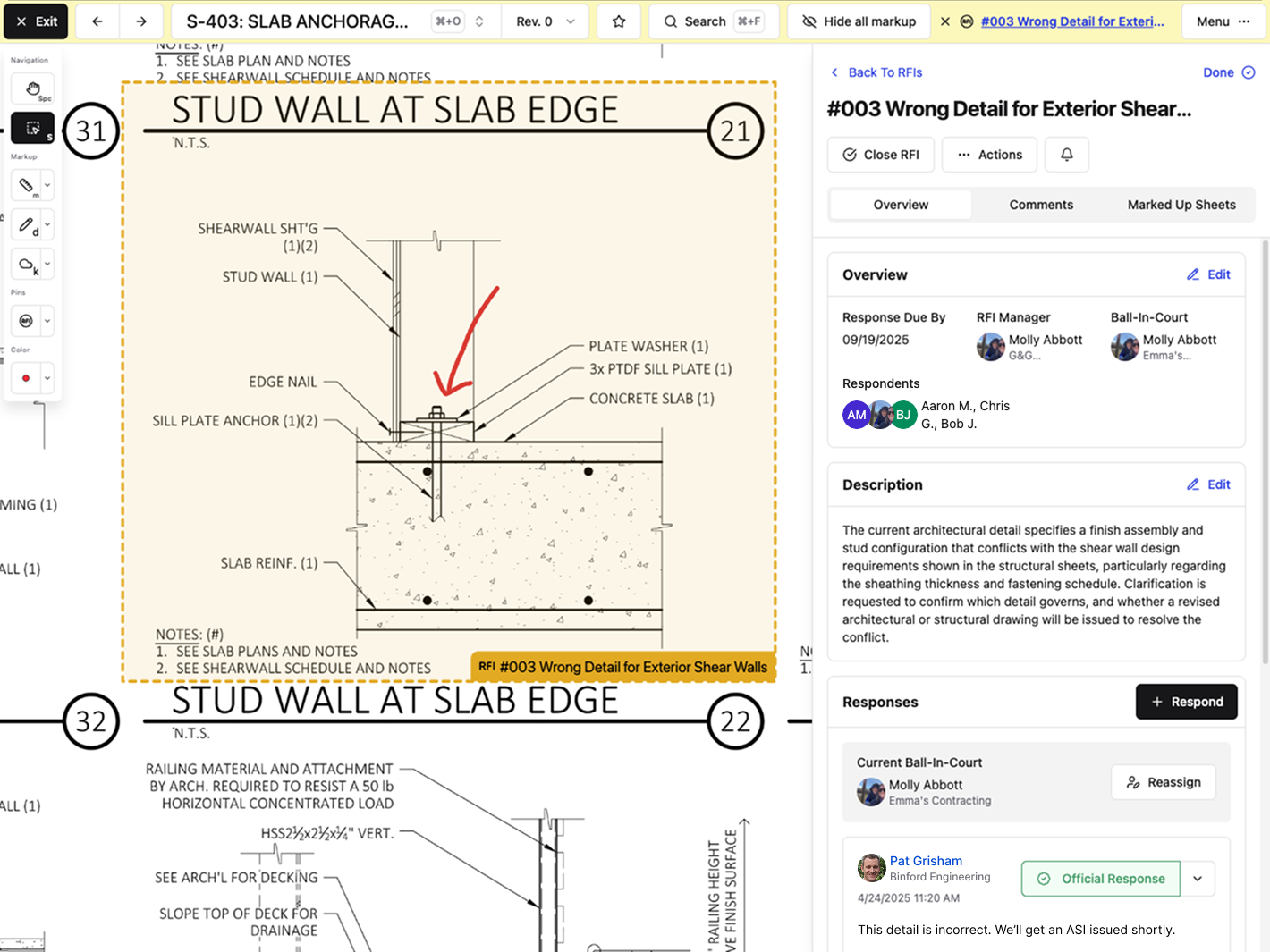
Markups and comments save directly to the drawing. Updates don't get buried in email or lost in a text thread. The crew pulls up the sheet on their phone and sees the current information right there. No digging. No guessing which version is correct.
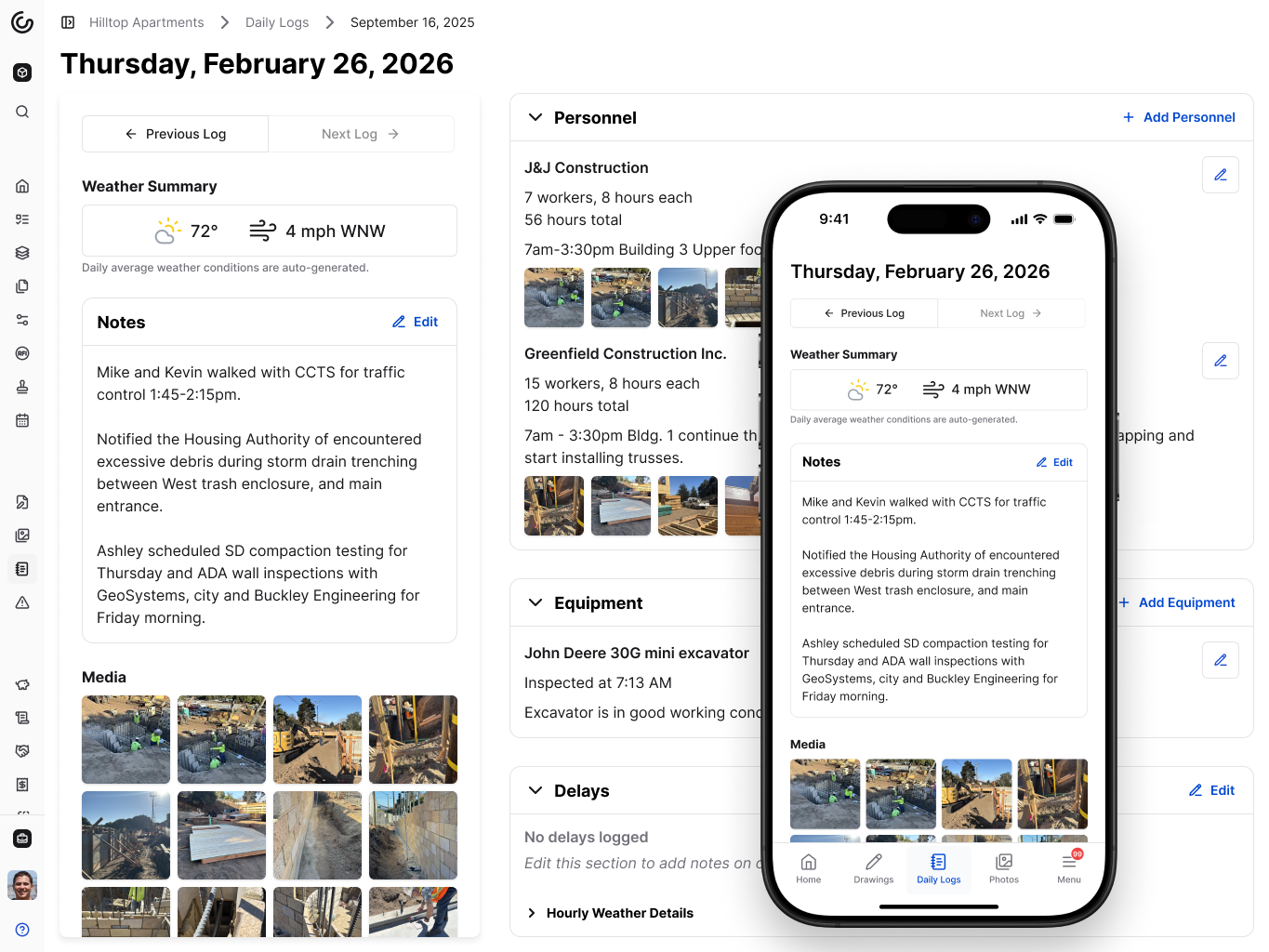
Daily logs capture hours, deliveries, and delays in a single place. Photos are attached to specific log entries and automatically organized into albums. When the superintendent asks what happened last Tuesday, the foreman opens that day's log instead of scrolling through a camera roll.
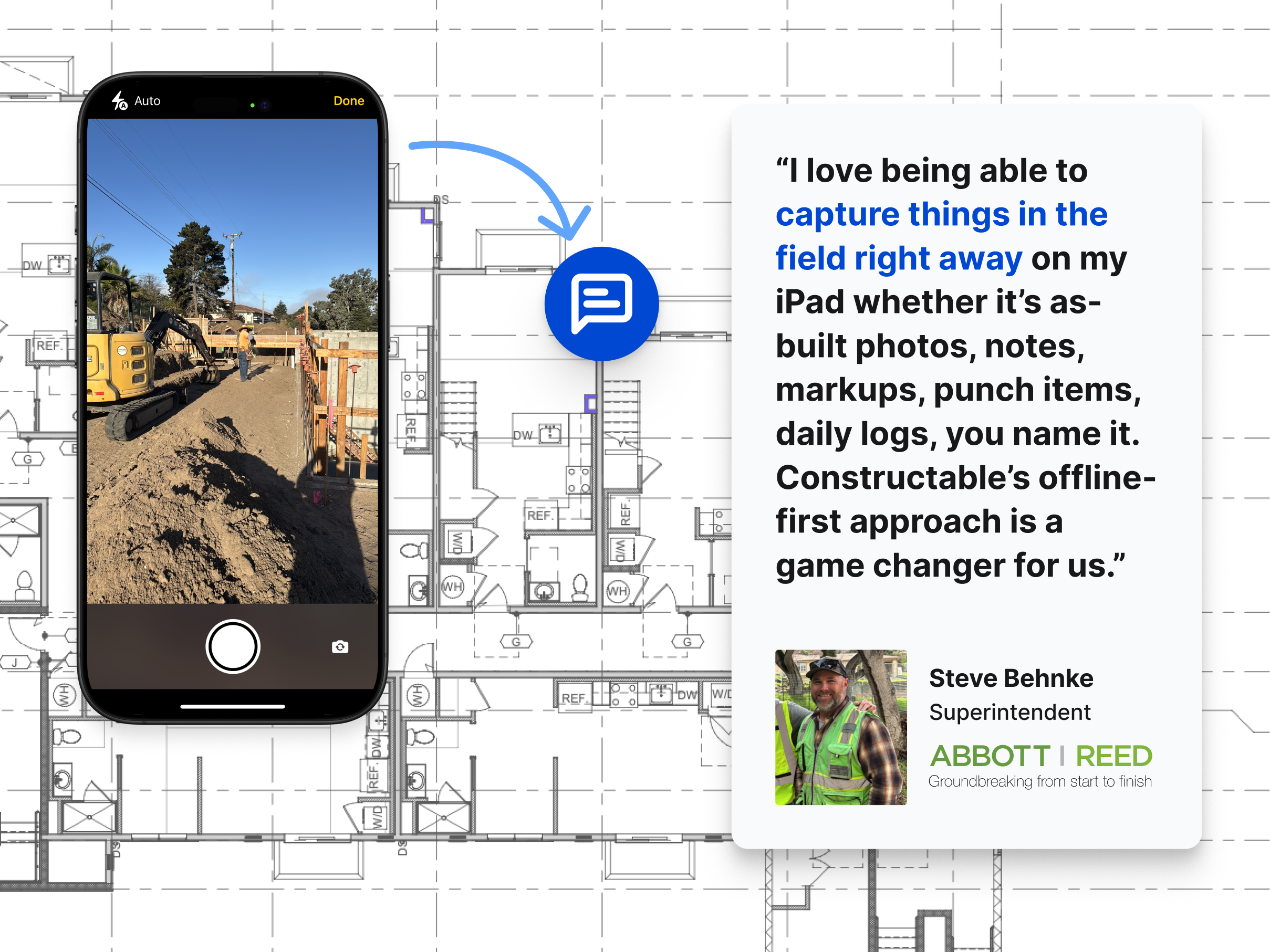
Mobile access mirrors the desktop experience. Foremen review RFIs, revisions, and logs from the jobsite without having to head back to the trailer.
Final Thoughts on Keeping Foremen Connected
Construction foreman responsibilities pile up fast when information scatters across texts, emails, and paper markups. Keeping everything connected to your drawings means your crew finds answers without pulling you away from the next problem. When the information is where it needs to be, you spend less time tracking things down and more time doing the work that actually matters.
FAQ
What's the difference between a construction foreman and a superintendent?
A foreman manages day-to-day work on the ground, coordinating crews, running safety meetings, and solving immediate problems, while a superintendent oversees the entire project, managing multiple foremen, the overall schedule, and subcontractor coordination.
How can a foreman keep track of verbal instructions given throughout the day?
Pin instructions directly to drawing locations in Constructable so they're documented exactly where the work happens, with timestamps and full context that crews can reference anytime from their phones.
Why do drawing revisions cause so many problems on the jobsite?
Revisions often don't reach the foreman fast enough, or crews don't know which sheets have changed, so they keep working from outdated plans until conflicts show up in the field and require rework.
How much project time gets wasted searching for information?
About 18% of project time is lost to workers hunting for specs, scrolling through text to confirm dimensions, or walking back to the trailer to check which drawing version is current.
Can subcontractors see updates in real time without calling the foreman?
Yes. When foremen post markups, RFI answers, or log entries in Constructable, everyone with project access sees updates on the relevant drawings immediately without waiting for a forwarded email or text.